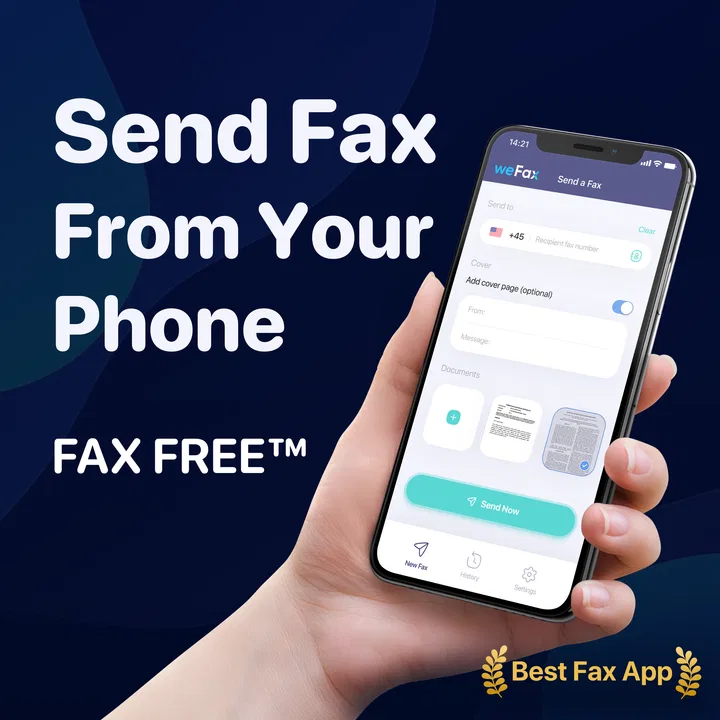
FAX FREE™: Send FAX From Phone
- 4.2
- Rating
- 100.00K
- Installs
- Free
- Price

 Analysis by App-foxy
I usually think of faxing as the kind of task that forces you back to an office, a bulky machine, or a desktop service. FAX FREE™: Send FAX From Phone takes a more practical route: it turns an Android phone into the place where I can prepare a fax and send it when I am away from a traditional setup. That makes it especially relevant for small businesses, independent workers, property managers, and anyone who occasionally receives a document that still has to travel by fax.
My overall impression is that this is a focused business app rather than an all-purpose document suite. It does not try to replace every scanner, cloud drive, or messaging tool on a phone. Its value is narrower and easier to understand: when a fax is required, I can handle the job from a mobile device instead of searching for a physical machine. That convenience is meaningful, although the experience still depends heavily on having a usable internet connection and a document that is ready to send.
How the fax experience changes when the network matters
The most important thing to understand is that mobile faxing is not simply a camera feature. The phone is the control point, but the sending process depends on communication between the app and the fax service. In practical terms, I treat a strong connection as part of the workflow, not as a minor convenience. If I am in a basement office, a crowded venue, or a building with unreliable mobile data, I would avoid leaving an important fax until the last minute.
You May Also Like

 Blood Strike: 2.5 Anniversary
Blood Strike’s Loadouts Turn Every Drop Into a Tactical Gamble
A close look at Blood Strike’s custom loadouts: how fast access to signature weapons reshapes its battle royale rhythm, rewards preparation, and narrows the gap between fights.

 Pandora - Music & Podcasts
Pandora’s Music Is Easy to Start, but Harder to Recover
Pandora’s strength is its low-effort path from a seed to a station. Its weak spot is how much confidence it asks you to place in connection, setup, and quiet recovery.

 8 Ball Pool
8 Ball Pool Is Built on Rivalries, Rematches, and Routine
A close look at the rivalries, rematches, shared routines, and unanswered safety questions that turn a quick pool match into a persistent mobile community.

 Samsung Music
Samsung Music’s Quiet Strength Is Playing What You Already Own
Its reach comes less from spectacle than from dependable access to a personal library. That simplicity is both the app’s strongest retention engine and its ceiling.

 AccuWeather: Weather Radar
AccuWeather Review: A Quick, Clear Forecast for Everyday Decisions
For everyday plans, the best forecast is the one you can understand quickly. AccuWeather makes rain timing, radar, and local conditions easy to act on, with a few trade-offs.

 Hill Climb Racing
Why Hill Climb Racing Still Turns Crashes Into One More Run
A tiny car, a bumpy hill and one more upgrade: Hill Climb Racing keeps resurfacing because its simple chaos makes every near-miss feel personal.
More From Our News Desk



This is where the app feels different from a conventional fax machine. A machine in an office may be connected to a fixed line and remain ready in one place. With this app, the advantage is mobility, but mobility also introduces variables. Wi-Fi can be more dependable than mobile data in one location, while the opposite may be true somewhere else. I would check the connection before preparing a time-sensitive document, particularly if the fax is needed for a deadline, an application, or a business transaction.
The app’s business focus makes sense in this context. A person who sends faxes every day may already have a dedicated office process, but someone who sends them occasionally can benefit more from avoiding equipment and setup. The phone is already with me, and that reduces the number of steps between receiving a document and acting on it. The trade-off is that I have to pay attention to the quality of the connection and the state of the document before starting.
One useful habit is to prepare the file before opening the sending workflow. I would rename it clearly, check that every page is present, and look at the edges for cut-off text or shadows. This matters more on a phone because it is easy to rush through a camera capture or select the wrong file from recent documents. A reliable connection cannot fix a blurry page, an incomplete attachment, or information that is difficult to read.
Using it away from the office
The strongest use case is a mobile situation where the fax requirement appears unexpectedly. Imagine a property manager visiting an apartment, a self-employed contractor meeting a client, or a small business owner working from a shared space. A document arrives by email or is handed over on paper, and the recipient needs a fax rather than an email attachment. Instead of postponing the task until returning to the office, I can use the phone as the starting point for the process.
That scenario is more realistic than treating the app as a replacement for every business communication method. Most people would not choose fax when email, a secure portal, or electronic signing is accepted. The benefit appears when the other party specifically asks for fax or when an established workflow still relies on it. In those moments, the app removes a physical dependency without requiring me to carry extra hardware.
I also see value for people who work between locations. A small clinic, repair business, consulting practice, or home office may not need a permanent fax machine but may still encounter occasional forms that must be sent in that format. The phone-based approach keeps the task available during travel and outside normal office hours, provided the connection and document are both ready.
For a person who sends a large number of pages regularly, I would compare the app with a dedicated business fax service before committing to it as the main system. A physical machine or established online account may offer a more predictable routine for high-volume work. The mobile app is most persuasive when convenience and occasional access matter more than building a complete document operations system.
What I would prepare before sending
There are three parts of the workflow I would separate: document quality, recipient details, and connectivity. Handling these separately makes the process less stressful. First, I inspect the document at full size. Then I confirm the destination information carefully. Finally, I make sure the phone has a stable connection and enough time to complete the operation without interruption.
This preparation is not glamorous, but it is one of the app’s practical lessons. A fax is often sent because the recipient needs a formal document, so a casual phone snapshot may not be good enough. I would place paper on a flat, well-lit surface, keep the phone parallel to the page, and review the result before sending. If the document comes from another app, I would open it first rather than assuming the correct version is selected automatically.
Another useful tip is to avoid switching between several demanding apps while a send is in progress. On a modern phone this may not be a problem, but mobile conditions vary. If I am using cellular data in a weak-signal area, I would keep the workflow simple and wait for a clear completion state before closing anything. The goal is not merely to tap send; it is to know whether the task actually finished.
I would also keep a personal record of what was sent and when, especially for business paperwork. That could be a note with the recipient, document name, and purpose. The app’s convenience makes sending easier, but convenience can also encourage careless filing. A fax that leaves the phone still needs to be traceable in my own records.
Reliability, recovery, and sensible data use
I treat recovery as part of sending, not an afterthought: if a connection falters, I first check whether the attempt finished before trying again, which helps avoid duplicate paperwork. For sensitive documents, I also make a habit of confirming the recipient and keeping my own brief record of what I sent. That careful routine is especially useful when a phone is handling business documents away from a familiar office.
What happens when connectivity is poor
The main friction point is connectivity. If the signal drops during preparation, the problem may be easy to solve by moving to Wi-Fi or a better location. If it drops during transmission, I would not assume that the fax arrived simply because the process began. I would look for a clear completion indication inside the app and, if necessary, repeat the process only after checking whether the first attempt finished.
That caution is important because duplicate sending can create confusion. Sending the same form twice may be harmless in some cases, but it can also cause the recipient to process the wrong copy or wonder which version is current. My preferred recovery method is to pause, verify the document and destination, then make one deliberate retry. I would not repeatedly tap the send control while the connection is unstable.
When a send fails, I would troubleshoot in a simple order. I would confirm that the phone is online, reopen the document, check that the destination details are unchanged, and try again from a location with a stronger connection. If the problem continues, I would use another accepted communication method to contact the recipient rather than spending an unlimited amount of time repeating the same attempt.
This is also where the app should be judged fairly. A phone-based fax tool can simplify access, but it cannot make a weak network behave like a stable office connection. If the task is urgent and the available signal is unreliable, a nearby business service or a known office fax may be the safer choice. The app is convenient, not magical.
Keeping mobile data under control
Fax documents can be surprisingly large when they contain scanned pages or detailed images. I would avoid sending a high-resolution color scan when a clean black-and-white document is sufficient for the recipient. This is not only about speed; it also helps keep mobile data use sensible. Before sending, I would review whether the file contains unnecessary pages, oversized images, or duplicate attachments.
Wi-Fi is my preferred option for longer documents, especially when I am traveling or using a limited mobile plan. Cellular data can still be useful when the fax is urgent, but I would be more careful with several-page files. A quick connection check and a glance at the file size can prevent an avoidable surprise. The most efficient workflow is usually the one that sends only the pages the recipient actually needs.
Data-conscious use also means thinking about privacy. A fax may contain financial details, identification documents, medical information, contracts, or internal business material. I would avoid preparing sensitive pages in a public place where someone can see the screen or the paper. I would also double-check the destination before sending, because a wrong number is a more serious mistake when the document is confidential.
For the same reason, I would not use the app casually for documents that do not need faxing. If an ordinary email or a secure business portal is accepted, that option may be simpler and more appropriate. Faxing is useful precisely because certain recipients still require it, but it should not become an automatic choice for every file.
Who will appreciate it most
I think this app suits Android users who send faxes occasionally and value the ability to work from a phone. It is a sensible fit for freelancers, mobile salespeople, landlords, office assistants, and small teams that do not want a dedicated machine sitting unused. The Everyone content rating also makes it broadly accessible, while the business category accurately reflects its purpose.
It is less suitable for someone looking for a full document-management platform. If I needed advanced collaboration, long-term filing, extensive editing, or a complete electronic signature workflow, I would look at a broader business service instead. This app addresses the sending problem, not every stage of document handling.
It may also be a poor match for users who rarely need faxing and already have an easy alternative nearby. Installing a specialized tool has little value if the task happens once every few years and a trusted office service is always available. The best reason to keep it is preparedness: when the need appears away from that office, the app can save time.
Cost is another point I would consider before making it part of a regular routine. The app is free to install, but in-app purchases range from around five dollars to around eighty dollars per item. That makes it important to understand the cost of the particular sending pattern rather than assuming that every fax is covered by the free download. For occasional users, the value may be strong if the alternative is buying equipment or making a special trip. For frequent users, I would compare the purchase structure with a conventional subscription or business fax provider.
How it compares with the usual alternatives
Against a physical fax machine, the app wins on portability and space. I do not need to locate a machine, connect paper, or return to a fixed desk. The machine still has an advantage for a busy office that sends many documents and wants a familiar, always-present process. Its reliability may also feel easier to manage when the office connection is already established.
Against email, the comparison is less about convenience and more about acceptance. Email is usually faster for ordinary files, easier to search, and more natural for conversation. Fax remains useful when the recipient insists on that format or when a particular organization has built its process around it. I would use this app to meet that requirement, not because fax is generally better than email.
Against public print-and-fax shops, the app offers privacy and immediate access from wherever I am. It can also save the time of traveling to a shop with a document in hand. A shop may still be preferable when I need help scanning difficult pages, when my phone connection is poor, or when I want a staff member to confirm that the transmission was handled correctly.
Against a general scanning app, the difference is the final action. A scanner can create a clean digital copy, but it does not necessarily solve the problem of sending that copy by fax. This app is more direct when the destination format is already decided. I would still use a dedicated scanner when image quality is the priority and then move the finished file into the fax workflow.
What the current release tells me about fit
Mobifarm is the developer behind this business app, which has reached over one hundred thousand installs and holds an average rating of 4.2 from around five thousand ratings. Those figures suggest that the idea has found a real audience, especially among people who need fax access without a permanent machine. I treat the rating as a useful signal rather than a guarantee, because the experience can vary with document quality, network conditions, and the user’s sending needs.
The app was released on November 10, 2021, and the current version is 1.1.25. It requires Android 7.0 or later, so users on older devices should check compatibility before planning around it. The free entry point makes it easy to test the workflow, but the in-app purchase range means I would review the available purchase option carefully before sending a large batch or relying on it for recurring business work.
I would also approach the app with realistic expectations about mobile ergonomics. A phone screen is adequate for checking a few pages, but it is not as comfortable as a desktop monitor for reviewing a long contract line by line. If accuracy matters, I would zoom into signatures, dates, account numbers, and small print before sending. That extra review is one of the clearest differences between a careful mobile workflow and a rushed one.
My verdict for connected, on-the-go faxing
In my experience, FAX FREE™: Send FAX From Phone makes sense when the fax requirement is occasional, mobile, and inconvenient to handle through traditional equipment. Its biggest strength is not that it changes faxing into something exciting; it makes an old-fashioned task available at the moment it is needed. For a freelancer at a client site or a small business without a permanent machine, that can be genuinely useful.
I would recommend it to someone who wants a practical backup for faxing and is comfortable checking the connection, reviewing documents carefully, and understanding the purchase options. I would not recommend making it the sole solution for heavy daily fax traffic, highly structured document operations, or situations where network interruptions could create serious consequences. A dedicated service or office setup may be better in those cases.
The best way to use it is deliberately: prepare a clean document, connect through the most reliable network available, confirm the recipient, send once, and verify completion before moving on. Used that way, the app gives the phone a useful business role without pretending that connectivity problems or document mistakes disappear. For occasional faxing away from a fixed office, its convenience is convincing; for high-volume or critical workflows, I would compare it carefully with a more established alternative.
FAQs for FAX FREE™: Send FAX From Phone
01What is FAX FREE™: Send FAX From Phone and how does it work?
FAX FREE™: Send FAX From Phone is a mobile faxing app designed to let you send documents directly from an Android or iOS device without using a traditional fax machine. You can usually import files from your phone, cloud storage, photos, or scanned pages, enter the recipient’s fax number, review the document, and submit it for transmission. Availability and supported file types may vary by device and region.
02Is FAX FREE™: Send FAX From Phone free to use?
The application may be free to download, but sending a fax commonly requires credits, a paid transmission, or a subscription. Before confirming a fax, check the current pricing shown inside the app, since costs can depend on the destination, number of pages, and available plan. Also review any trial terms, automatic renewal settings, and in-app purchase conditions before subscribing.
03What documents and file formats can I send with the app?
FAX FREE™: Send FAX From Phone is intended for everyday documents such as PDFs, images, forms, receipts, and photographed paperwork. The exact supported formats and page limits should be checked in the app because they can change between updates or platforms. For the clearest result, use well-lit scans, crop unnecessary background, confirm that every page is readable, and preview the document before sending.
04Can I receive faxes with FAX FREE™: Send FAX From Phone?
The app’s primary purpose is generally sending faxes from a mobile device, not necessarily providing a permanent fax number for receiving them. Receiving capability, if offered, may depend on a separate feature, subscription, or regional availability. Users who need two-way faxing should verify the current App Store or Google Play listing and the in-app feature descriptions before downloading or purchasing a plan.
05Is it safe to send sensitive documents through FAX FREE™: Send FAX From Phone?
You should treat mobile faxing as a service that handles potentially private documents and review the app’s privacy policy, permissions, data practices, and transmission terms before use. Avoid sending highly sensitive information unless you understand how it is processed and stored. Use a secure connection, keep the app updated, double-check the recipient’s fax number, and delete uploaded files or app history when appropriate.
Pros
- Send faxes directly from your smartphone without a physical fax machine.
- Supports document scanning and photo imports for quick fax preparation.
- Useful for occasional faxing when you need to send documents while traveling.
- Provides delivery status updates to help confirm whether a fax was transmitted.
- Works with common file types
- making it easy to fax stored documents.
Cons
- Fax credits or subscriptions may become expensive for frequent users.
- A stable internet connection is required to send documents successfully.
- Large files or multi-page documents can take longer to upload and process.
- Scanned pages may need manual cropping or adjustment for clearer results.
- Recipient availability and international fax rates may vary by destination.

FAX FREE™: Send FAX From Phone
Gallery